

Magnific
AI image tools, a collaborative canvas and stock assets
Magnific, the creative platform formerly Freepik, combines AI image models, editing and upscaling with a stock library and a canvas for connected creative work.
Free plan availableAccount required
- Access
- Free and paid plans
- Example plan
- EUR 16 / monthPremium monthly — EUR
- Available on
- Web, Desktop, Mobile, API
What is Magnific?
Magnific is the creative platform that previously operated under the Freepik name. It brings AI tools and stock content together, with image generation, editing, upscaling, video and audio tools. The rebrand carries existing Freepik accounts and projects into Magnific; the official announcement describes a staged workspace rollout.
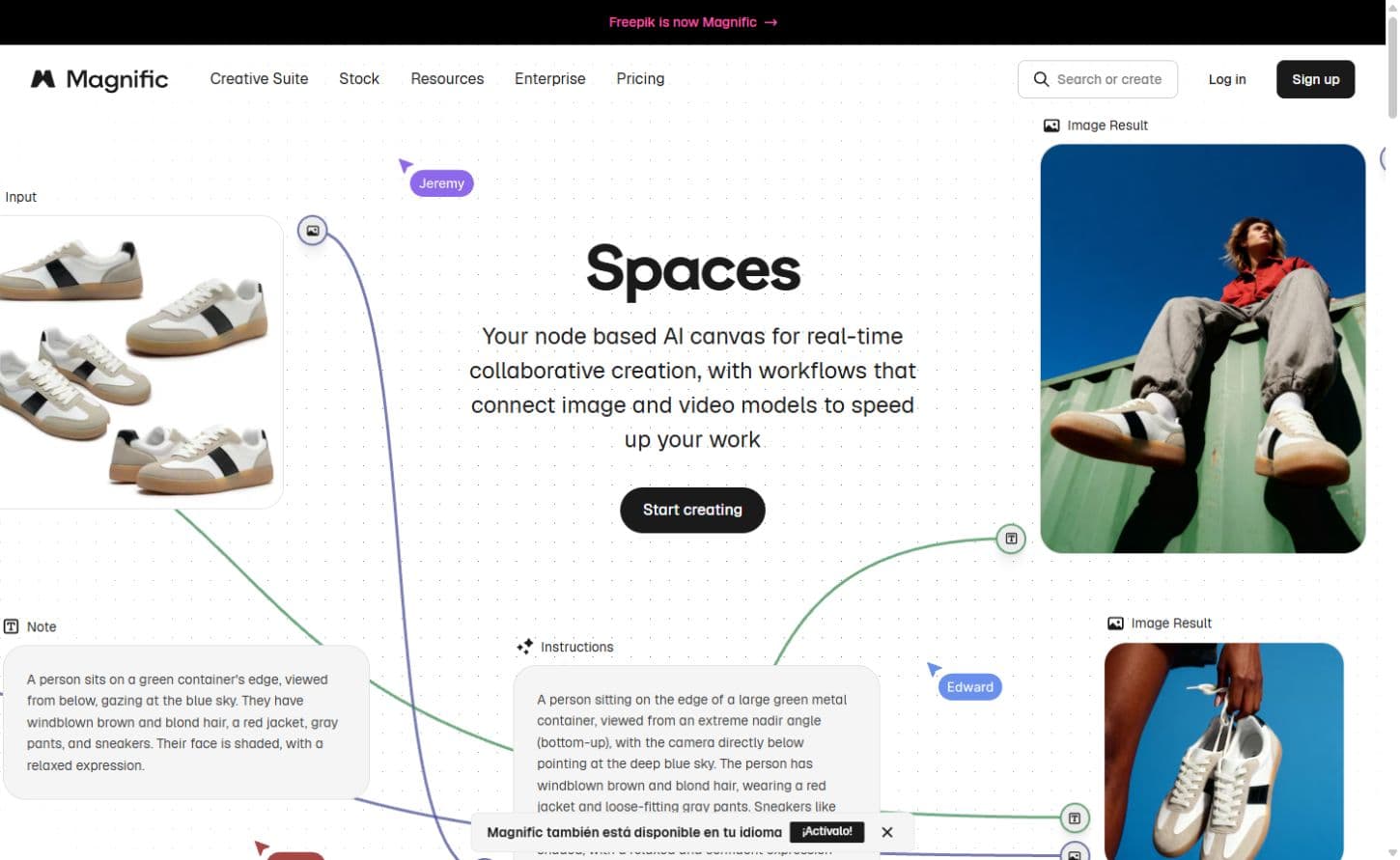
Spaces adds a canvas for connecting prompts, reference assets and model operations. Nodes make related creative steps visible in the same place, while collaborators can review and continue the work. Templates provide starting points for product scenes, variations and other connected tasks.
Image enhancement remains an important part of the suite. The Creative upscaler exposes controls for adding detail and varying how closely a result follows the original. Classic upscaling serves a simpler enlargement role. Magnific also retains a separate legacy service at magnific.ai, so its old standalone subscriptions should not be confused with the creative-suite plans described here.
Best for
- Designers combining generated visuals with stock photos, vectors and templates.
- Creative teams building reusable operations on a shared canvas.
- Creators refining image detail, backgrounds and presentation assets.
Limitations
The Free plan has limited access and personal-use licensing conditions. Credit consumption varies by model and settings. Unlimited access covers selected models and resolutions; editing, audio, video and premium operations can still consume credits. Legacy magnific.ai subscriptions are separate.
Magnific features
AI image models
Generate from prompts and references using several model families. Manual model selection and Auto mode sit alongside aspect-ratio and other model-specific settings.
Spaces creative canvas
Connect assets, prompts and model operations as nodes. Reuse a sequence and invite collaborators to review or continue work on the same canvas.
Creative upscaling
Adjust Creativity and Resemblance to balance added texture against the source image. Classic upscaling offers a simpler option; output limits vary across models.
Stock assets
Paid plans include the premium library alongside AI tools. Photos, vectors, templates and other downloads follow their own licensing and usage conditions.
Editing and finishing
Retouch an area, remove a background, extend a scene or adjust lighting. Generated images can continue into edits and the Spaces canvas.
Developer access
Magnific provides an API, MCP connections and integrations for external tools. The rebrand announcement says existing Freepik API keys continue to work on both API domains.
Magnific pricing
Free plan available. Subscription plans. Visit Magnific for full plan details and current offers.
Example plans.
Premium monthly — EUR
EUR 16 / month
Magnific individual plans
Plan details
Monthly billing; 20,000 credits/month. Displayed EUR locale; VAT and local taxes excluded.
Premium+ monthly — EUR
EUR 36 / month
Magnific individual plans
Plan details
Monthly billing; 45,000 credits/month. Selected unlimited-model access; VAT and local taxes excluded.
Pro Starter monthly — EUR
EUR 88 / month
Magnific individual plans
Plan details
Selected 112,500-credit/month tier; monthly billing. Larger Pro tier is separate. VAT and local taxes excluded.
Technical specifications
Image generation
| Feature | Magnific |
|---|---|
| Prompt and reference inputs | Text prompts, uploaded references, model selection and aspect-ratio controls; custom style, character and object options depend on the model.Selected model and plan |
| Editing controls | Conversational edits, region retouching, background removal, relighting, extension and variations, with further work on the Spaces canvas.Selected model and plan |
| Output dimensions | Image-generation output depends on the selected model and resolution; selected models support 4K. Upscaling is separate, with advertised Classic/Magnific enlargement up to 16×.Selected model and plan |
| Style and character controls | Reusable custom characters, objects, styles and image references can guide related images; availability and credit charges depend on the model and plan.Selected model and plan |
| Output licensing and privacy | Free-plan use is personal and requires attribution under the plan documentation. Paid plans include commercial AI licensing; stock and merchandise licensing have separate conditions.Selected model and plan |
| API access | SupportedSelected model and plan |
Magnific alternatives
Related AI creative suites
Krea
Multi-model image tools, a live drawing canvas, custom styles and upscaling.
Compare with MagnificRecraft
Image and SVG generation, a design canvas and product mockups.
Compare with MagnificLeonardo.Ai
Image generation with trained Elements, editing and asset refinement.
Compare with MagnificMagnific FAQs
Is Freepik now Magnific?
Freepik’s official announcement says its creative platform is moving to the Magnific brand, with existing accounts, subscriptions and projects carried over. Workspace access is rolling out in stages.
Is Magnific the same as the legacy magnific.ai upscaler?
The creative suite at magnific.com links to magnific.ai as a separate legacy service. This page covers the current creative suite, including its image tools, Spaces and stock assets.
Are Magnific’s unlimited generations unlimited across every tool?
Unlimited access applies to selected models and settings under the plan. Other models, higher resolutions, video, audio, edits and advanced operations can still consume credits.
Is this your product? Claim this page to update your listing.