

DataRobot
DataRobot: automated machine learning, predictive analytics and AI deployment
DataRobot develops predictive models from business data and supports their deployment and monitoring. Its automated experiments, model leaderboard and explanations help teams move from a dataset to an operational AI application.
Free trial availableAccount required
- Access
- Free trial available
- Available on
- Web, API
Predictive analysis with a path to production
DataRobot is an enterprise AI platform with predictive, generative and agent-building capabilities. For data analysis, its main distinction is automated model development: teams can create classification, regression and forecasting experiments, then compare candidate models through a leaderboard rather than rely only on descriptive charts.
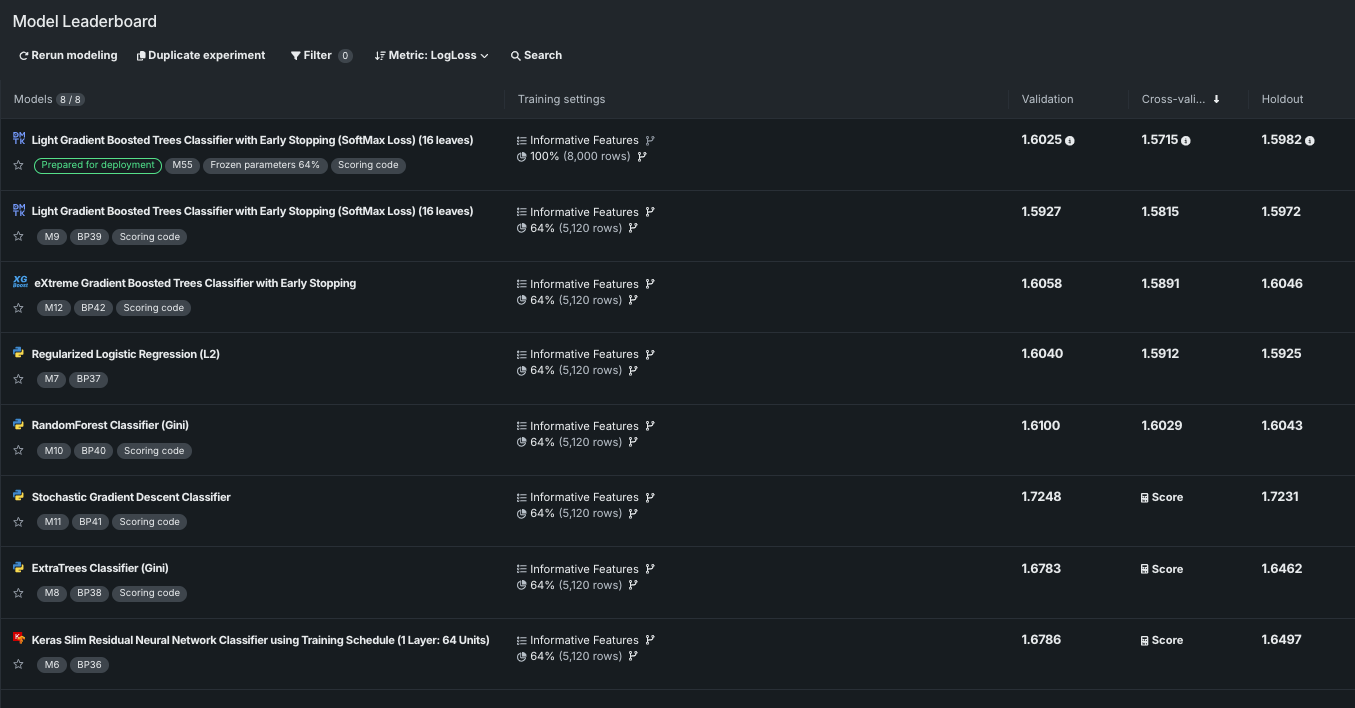
The leaderboard brings model metrics and training information together. Available insights help explain model behavior, inspect predictions and investigate feature relationships. These are tools for evaluating a particular experiment; a high score on one dataset does not establish universal accuracy or remove the need for sound validation.
Data can come from the registry, supported connections, snapshots or uploaded files. Connected data may need a snapshot before it can be previewed or prepared. The platform supports model deployment, prediction endpoints and ongoing monitoring, including drift and other operational signals. Cloud, private-cloud and self-managed arrangements have different provisioning requirements.
Chart and data exports support reporting outside the platform. Some insights provide PNG images, CSV data or a ZIP containing both. Role-based access separates viewing, editing and ownership, while organizational permissions can override an individual object’s sharing settings. Access to the data itself is required for permitted downloads.
Best for
- Teams building predictive business applications
- Data scientists comparing models and forecasts
- Organizations managing deployed AI and model governance
Limitations
This is a modeling and deployment platform, so setup is more involved than a spreadsheet chat tool. Training and file limits vary by format, deployment and enabled features. Experiment scores and generated explanations do not guarantee reliable performance on new data.
DataRobot features
Automated predictive experiments
Develop supported classification, regression and forecasting models.
Model leaderboard
Compare candidate models with available evaluation metrics.
Explainability and insights
Inspect supported feature relationships and prediction explanations.
Connected data preparation
Use registry datasets, connections, snapshots and uploaded files.
Deployment and monitoring
Operationalize predictions and track deployed model behavior.
Chart and data exports
Export supported insights as images and data files.
DataRobot pricing
Free trial available. Plans and included features vary. Visit DataRobot for full plan details and current offers.
Technical specifications
Data analysis
| Feature | DataRobot |
|---|---|
| Data inputs and connections | Registry datasets, supported native/JDBC connections, snapshots and CSV/TSV/Excel or other supported files. Dynamic JDBC data needs a snapshot for preview or wrangling.Configured use case and data access |
| Analysis workflow | Automated predictive modeling, model comparisons, forecasting and supported model insights; deployment and monitoring extend beyond exploratory analysis.Enabled predictive platform capabilities |
| Charts and reproducible outputs | Supported insight charts as PNG, data as CSV or combined ZIP; available formats depend on the chart. Deployed prediction endpoints serve permitted applications.Insight-specific export and deployment permissions |
| Data permission controls | Consumer, editor, owner and administrator roles separate viewing and changes; organization roles can override sharing. Dataset downloads require data access.Organization and entity permissions |
| Data and compute limits | SaaS AutoML XLSX is limited to 150 MB; Essentials CSV to 5 GB. Eligible 100 GB configurations require specific features and exclude some capabilities; these are not universal platform limits.Format, deployment and feature-dependent training limits |
| Maximum data file size (MB) | 150XLSX in SaaS AutoML; not a general dataset limit |
| API access | SupportedAuthenticated prediction endpoints for configured deployments |
DataRobot alternatives
These platforms offer broader data preparation or analysis in a different development environment.
Dataiku
Visual and code-based pipelines with modeling and AI applications.
Compare with DataRobotDatabricks AI/BI
Lakehouse analytics and governed conversational SQL.
Compare with DataRobotDataRobot FAQs
Does DataRobot have a free trial?
DataRobot advertises a 30-day trial covering its current platform capabilities. Enterprise pricing and deployment terms are account-specific.
Is DataRobot mainly a chatbot for spreadsheets?
Its predictive analytics focus is developing, evaluating, deploying and monitoring models. It also offers generative and agentic features, but automated modeling is a different task from a simple chat-based spreadsheet summary.
How large can an uploaded DataRobot file be?
Limits depend on format, deployment and features. SaaS AutoML documents a 150 MB XLSX limit and a 5 GB Essentials CSV limit; eligible large-data configurations can support up to 100 GB with additional restrictions.
Can I export DataRobot results?
Supported charts and insights provide PNG images, CSV data or both in a ZIP. Available formats differ by insight, and data downloads require the relevant access rights.
Is this your product? Claim this page to update your listing.