

Gumloop
Gumloop: connected AI agents, reusable skills and team automation
Gumloop builds AI agents that work with connected apps, company knowledge and reusable skills. Run them in a conversation, through team channels or from automated triggers, with tool permissions controlling the actions they can take. Its hosted platform combines model choice, MCP connectors and task-level visibility into usage costs.
Free trial availableAccount required
- Access
- Free trial available
- Example plan
- USD 37 / monthPro — starting monthly plan
- Available on
- Web, API
Give business agents access to apps, knowledge and recurring tasks
Gumloop agents carry out tasks using the services and information connected to them. A task is a separate conversation with its own files, history and usage cost. Model choice, instructions and attached connectors determine how the agent responds, while the task view keeps its work and generated artifacts together.
Reusable skills capture instructions for repeatable work. Brain connects company information from services such as Drive, Notion, Slack and GitHub, with knowledge sources attached to the relevant agent. Team channels extend the experience to Slack, Microsoft Teams and email; a hosted page, API or MCP connection can expose an agent elsewhere.
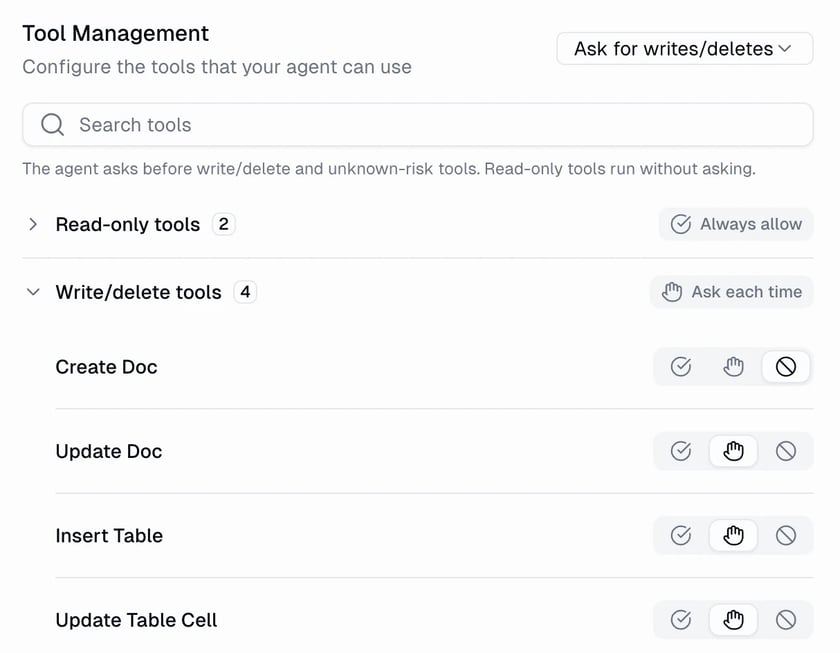
Tool permissions control what each connector can do. Always allow runs tools directly; other settings require approval for every call, only writes and deletes, or individual tools. A gated action pauses until a person responds. These controls are configured per connector or tool, so human review depends on the agent’s settings.
The platform reports separate model, tool, compute and orchestration costs for a task. Pro’s included credits are shared through the organization, with optional overage and its own cap. Enterprise adds negotiated usage and deployment arrangements. Connected services and model providers remain part of the process, including when the organization supplies its own model keys.
Best for
- Teams using agents across connected business apps
- Shared agents in Slack, Teams and email
- Recurring research, reporting and document tasks
Limitations
Task costs vary with the model, conversation length, connected tools and active processing time. The trial needs a card and converts to paid Pro unless cancelled. Monthly Pro credits expire at renewal. Tool approval is configurable and Always allow is the documented default. VPC deployment and negotiated fees are Enterprise arrangements.
Gumloop agent and team features
Connected app tools
Give an agent the app and MCP tools needed for a task, using personal or team account connections.
Reusable skills
Capture repeatable instructions and attach them to relevant agents.
Company knowledge
Connect searchable company sources through Brain and select the information an agent can use.
Tool approval controls
Allow, deny or require approval for connector actions, including writes and deletes.
Triggers and team channels
Run agents from schedules or events and make them available in existing communication tools.
Task usage breakdown
View model, connector, compute and orchestration charges for an agent conversation.
Gumloop pricing
Free trial available. Subscription plans. Visit Gumloop for full plan details and current offers.
Example plans.
Pro — starting monthly plan
USD 37 / month
Gumloop organization
Plan details
One organization, 20,000 monthly credits; unlimited seats, agents and teams. Credits cover variable model/tool/compute charges and orchestration.
Technical specifications
Automation and agents
| Feature | Gumloop |
|---|---|
| Connectors and tool access | Connected apps and custom MCP servers, reusable skills and company knowledge sources. Personal, specific or team account selection determines which connected identity an agent uses.Configured connectors and credentials |
| Triggers and scheduling | App events, webhooks, recurring schedules and one-time triggers can start agent tasks. Channels include Slack, Teams, email, hosted pages, API and MCP.Configured triggers and channels |
| Human approval controls | Connector tools can always run, ask each time, ask for writes/deletes or be denied individually. Always allow is the documented default; configured gates pause for explicit approval.Per-connector/per-tool permissions |
| Hosting and deployment | Hosted Gumloop platform; Pro can host one custom MCP server on Gumloop infrastructure. Enterprise offers optional VPC deployment with negotiated terms.Pro/Enterprise deployment scope |
| Execution accounting | USD 0.005 per credit: model cost, successful connector calls and active compute, plus 8% orchestration. Own model keys waive model credits but carry 16% on equivalent full task cost.Pro standard fee; Enterprise negotiated |
| API access | SupportedAgent API and MCP developer channels |
Gumloop alternatives
Explore other hosted agents and platforms for connected automation.
Relevance AI
Agents and visual multi-agent Workforces with separate Action and Vendor Credit billing.
Compare with GumloopLindy
A team assistant for Slack, email, meetings and reusable work routines.
Compare with GumloopGumloop FAQs
Is Gumloop free?
Gumloop offers a 14-day Pro trial that requires a card. It becomes a paid subscription unless cancelled; Pro starts at USD 37/month with20,000 monthly credits.
How does Gumloop charge for agent tasks?
Credits pay for model usage, successful connector calls and active compute, plus an orchestration fee. Costs vary by task rather than using a fixed price per message or completed workflow.
Can Gumloop require approval before changing data?
Yes. Connector settings can ask for writes and deletes, every tool call or selected tools. Gated actions wait for approval; Always allow is the documented default.
Can I use my own model API keys?
Yes on Pro and Enterprise. Model calls use your provider account and consume no model credits, while tool and compute charges remain. The standard orchestration fee becomes 16% of equivalent full task cost.
Is this your product? Claim this page to update your listing.