

Codex
Codex: OpenAI’s AI coding agent for repositories
Codex is OpenAI’s coding agent for repository edits, debugging, tests and code review. It works in the terminal, supported IDEs and the ChatGPT desktop app, with separate cloud environments for work that continues away from your computer.
Free plan availableAccount required
- Access
- Free and paid plans
- Example plan
- USD 8 / monthChatGPT Go
- Available on
- Desktop, Web, Mobile, API
AI coding across the repository, terminal and editor
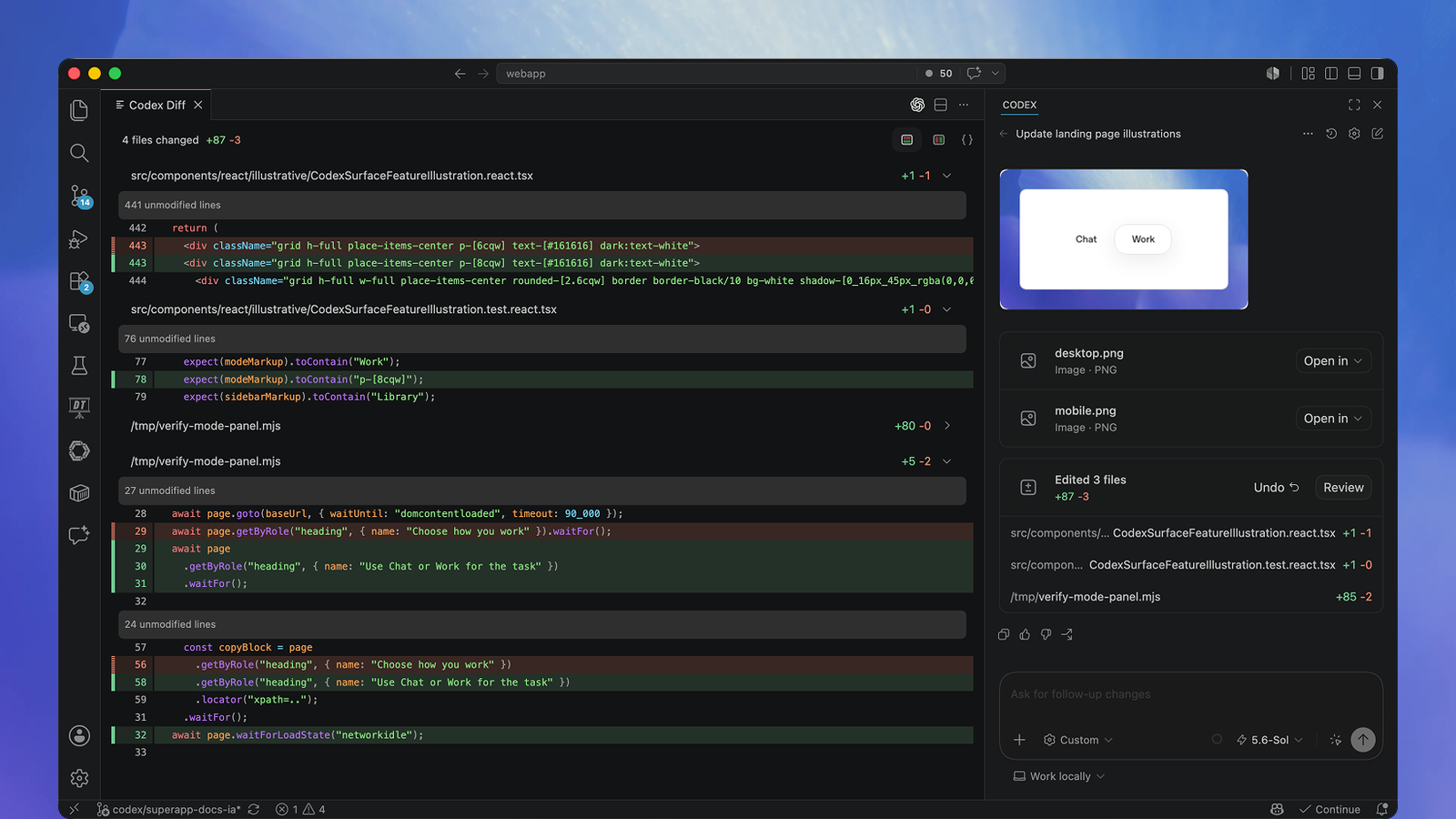
Codex works with a development project rather than only generating a code snippet. In the terminal, it can inspect files, edit the repository and run the tools already installed in that environment. A session can investigate a bug, implement a change, run tests and discuss the resulting diff. Dedicated review commands cover uncommitted work, an individual commit or changes against a base branch. The code and command output remain available for a developer to inspect.
The IDE experience keeps selected code and open files beside the conversation. VS Code and compatible editors use the Codex extension, while supported JetBrains and Xcode integrations have their own entry points. In the ChatGPT desktop app, Codex can work directly in a project or use a separate Git worktree. Worktrees provide separate checkouts for parallel tasks while retaining the repository’s shared history. They run on the computer or development host that contains the project, even when a phone is used to guide the work remotely.
Codex Cloud uses published environments containing the repositories, dependencies and access settings needed for a task. Each task gets its own working files and can continue while the developer’s computer is asleep. Local files, browser sessions and VPN access are not automatically transferred into that environment. Model requests also need to be distinguished from code execution: a local terminal or worktree still uses remote OpenAI inference. Available models and controls follow the account, client and workspace, while API-key billing remains separate from ChatGPT subscription usage.
Best for
- Developers working across the terminal and supported IDEs
- Repository changes involving tests and code review
- Teams using local worktrees and reusable cloud environments
Limitations
Included usage depends on the model and task, and published message ranges are estimates. Local execution uses remote model inference. Cloud tasks require a prepared environment and appropriate access. Full-access settings remove sandbox boundaries. Generated changes and review findings still need developer judgment.
Codex features
Repository changes and tests
Inspect project files, implement changes and run development commands within the task’s permitted environment.
Editor context and diff review
Use open files and selections in supported IDEs, then review changed lines beside the conversation.
Terminal automation
Run interactive sessions or non-interactive codex exec commands in scripts and CI.
Parallel worktrees
Keep local tasks in separate Git checkouts, with the desktop app managing their relationship to the main project.
Reusable cloud environments
Prepare a hosted development environment and start isolated tasks that can continue while your computer is asleep.
Codex pricing
Free plan available. Plans priced per user. Visit Codex for full plan details and current offers.
Example plans.
ChatGPT Go
USD 8 / month
Codex
Plan details
Lightweight desktop access, subject to rollout.
ChatGPT Plus
USD 20 / month
Codex
Plan details
Shared Codex/Work usage; optional purchased credits.
ChatGPT Pro $100
USD 100 / month
Codex
Plan details
A Pro tier with included usage; allowances depend on the plan and model.
Technical specifications
Coding assistants
| Feature | Codex |
|---|---|
| Editor and terminal interfaces | Terminal CLI, supported IDE integrations, and Codex in the ChatGPT desktop app on macOS, Windows and Linux. Eligible cloud tasks can be started or continued on web, mobile and desktop.Access depends on plan, client and sign-in |
| Repository context | Use repository files, open editor selections, AGENTS.md instructions, skills and MCP tools. Git worktrees isolate local checkouts; each cloud task starts with its own files from a published environment.Local worktrees and cloud environments are distinct |
| Agent actions | Inspect files, write multi-file changes, execute development commands and tests, and review diffs. Local review supports uncommitted changes, commits and base branches; cloud tasks continue on hosted infrastructure.Commands require the relevant environment and permissions |
| Model access | OpenAI model access follows the plan, client, rollout and workspace controls. Current documentation includes GPT-6.1 Sol, GPT-6 Sol, Luna and Astra. GPT-5.5 retires from ChatGPT-sign-in surfaces on 14 October 2026; API availability is separate.Not every model is available on every tier or client |
| Execution and review controls | Local commands use platform-specific filesystem/network sandboxing and configurable approval policies. Full access removes these boundaries. Eligible automatic approval review does not expand the sandbox. Managed policy and local/cloud execution have separate scopes.Execution controls and data terms depend on environment |
Codex alternatives
Related coding agents offer different models, editors and hosting options.
Claude Code
Claude-based repository development in the terminal and supported editors.
Compare with CodexDevin Desktop
A full IDE and command centre for local, cloud and compatible third-party agents.
Compare with CodexCursor
An AI-focused editor with repository context and integrated coding agents.
Compare with CodexCodex FAQs
Is Codex free?
Limited Codex access is included with ChatGPT Free, subject to the desktop rollout. Broader plan access and larger allowances are available through paid subscriptions. API-key usage is billed separately.
Does Codex work in VS Code and JetBrains IDEs?
VS Code and compatible editors use the Codex extension. Supported JetBrains IDEs provide Codex through AI Chat, and Xcode has its own coding-assistant integration. Availability depends on the IDE, client and account.
Can Codex continue while my computer is asleep?
Hosted Codex Cloud tasks can continue in their own environments while your computer is asleep. Local tasks and worktrees depend on the computer or development host running them; mobile Remote controls that host rather than moving execution onto the phone.
Are Codex models running locally?
Local Codex sessions execute development tools on your computer, but model requests use remote OpenAI services. Code execution, model processing and cloud-task hosting are separate parts of the product.
Is this your product? Claim this page to update your listing.