

Make
Make: visual automation, connected apps and AI-agent workflows
Make combines a visual automation canvas with app connectors, branching scenarios and AI-agent tools. Connect services, transform data and add agents that use knowledge, app actions or MCP tools. Its cloud platform is particularly relevant to operations teams building connected processes with detailed execution visibility.
Free plan availableAccount required
- Access
- Free and paid plans
- Example plan
- USD 9 / monthCore — annual commitment
- Available on
- Web, API
Connect apps, data and AI on a visual automation canvas
Make represents an automation as a scenario: connected modules pass information between apps, transform it and send results onward. Routers and filters let a process branch, while schedules and app events determine when it starts. This makes the canvas useful for processes such as moving business records between systems or coordinating several actions from one incoming event.
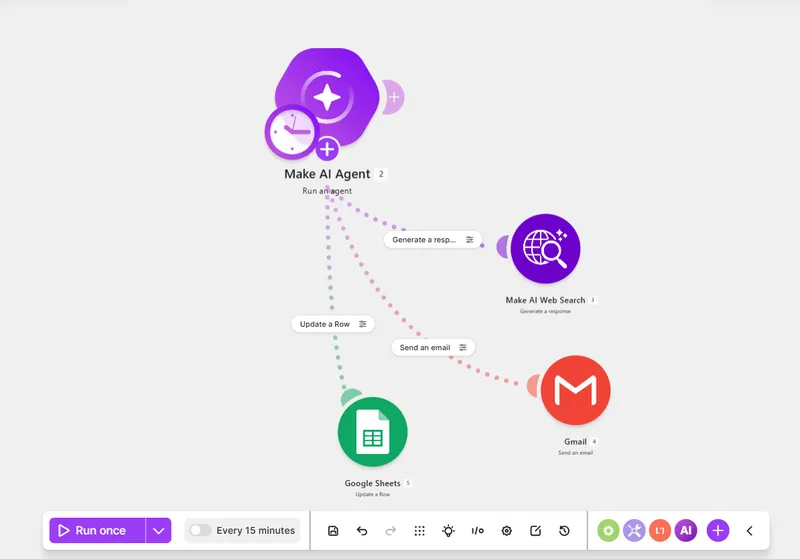
The current AI Agent app adds model connections, knowledge and tools to that canvas. An agent can use an app module, another scenario or a third-party MCP tool, then return text or structured data. Conversation IDs preserve a thread across runs; a blank ID starts a new conversation. Execution metadata shows tool steps and token usage, while the Reasoning panel helps explain a run. The agent app remains in open beta.
Make’s AI Provider is available on all plans and includes model consumption in credit usage. Paid plans can connect their own providers, which charge separately for tokens. Knowledge processing, tool calls and agent chat can also consume credits, so one complete AI workflow is not necessarily one credit. Code execution is another separately metered feature.
The platform runs in the cloud. Its Enterprise on-prem agent provides access to local networks rather than a self-hosted replacement for the whole service. Native Human in the Loop requests are currently an invited Enterprise beta. Other review processes can be built with connected tools, but approval behavior depends on the configured flow rather than a universal approval requirement.
Best for
- Operations teams connecting apps and data
- Visual workflows with branching and transformations
- AI agents embedded in multi-step processes
Limitations
Credits are not complete workflow runs, and AI usage varies by model, tokens and tools. Free has two active scenarios, 15-minute schedules, five-minute runtime and 5 MB files. Native approval requests require invited Enterprise beta access. The AI Agent app is open beta; own-provider charges and cloud processing remain separate considerations.
Make automation and AI-agent features
Visual scenarios and data mapping
Connect modules, transform records and branch a process with routers and filters on one canvas.
AI tools and knowledge
Give an agent knowledge files and access to app modules, scenarios or third-party MCP tools.
Conversation and structured results
Keep a conversation thread with an ID or return text and structured data for subsequent modules.
Execution visibility
Inspect outputs, tool steps and token metadata; Pro adds full-text execution log search.
Scheduled workflows and API
Core and above add one-minute schedules, unlimited active scenarios and plan-limited Make API access.
Team and Enterprise controls
Teams adds roles and shared templates; native human-review requests are an invited Enterprise beta.
Make pricing
Free plan available. Subscription plans. Visit Make for full plan details and current offers.
Example plans.
Core — annual commitment
USD 9 / month
Subscription
Plan details
Monthly equivalent, billed annually; 10,000 credits/month. Core API access, one-minute schedules; extra usage separate.
Pro — annual commitment
USD 16 / month
Subscription
Plan details
Monthly equivalent, billed annually; 10,000 credits/month. Priority execution and searchable logs; extra usage separate.
Teams — annual commitment
USD 29 / month
Subscription
Plan details
Monthly equivalent, billed annually; 10,000 credits/month. Team roles and shared templates; extra usage separate.
Technical specifications
Automation and agents
| Feature | Make |
|---|---|
| Connectors and tool access | App connectors, visual data mapping, routers and filters. Current AI Agent supports knowledge files, module/scenario tools and third-party MCP tools.AI Agent (New) is open beta; custom AI providers require paid plans |
| Triggers and scheduling | Connected-app events and scheduled scenarios. Free allows two active scenarios with a 15-minute minimum interval; paid plans allow one-minute schedules and unlimited active scenarios.Active scenarios and schedules remain subject to credit quotas |
| Human approval controls | Native Human in the Loop review requests are an invited Enterprise closed beta. Other agent review flows require configured tools and instructions; not every action is automatically gated.Enterprise beta versus separately designed review flows |
| Hosting and deployment | Hosted on AWS in EU/North America. Enterprise on-prem agent connects local networks; it does not establish that all scenario processing is self-hosted.Cloud platform and plan-specific local-network access |
| Execution accounting | Most non-AI operations use 1 credit. Make-provider agents add model/token charges; tools/chat and knowledge can add usage. Own-provider connections bill Make operations and provider tokens separately.Credits, module operations and complete scenario runs are distinct |
| API access | SupportedCore and above; rate limits depend on the plan |
Make alternatives
Other platforms offer different app builders, billing models and deployment choices.
n8n
Cloud or self-hosted workflows with code and whole-workflow execution billing.
Compare with MakeGumloop
A visual automation builder oriented toward AI-powered business processes.
Compare with MakeMake FAQs
Is Make free?
Make has a permanent Free plan with 1,000 credits per month, two active scenarios and a 15-minute minimum schedule interval. Free file size and run-time limits are lower than paid plans.
How much does Make cost?
At 10,000 monthly credits, Core is USD 9/month equivalent, Pro USD 16 and Teams USD 29 with annual billing. Monthly billing and larger quotas have separate rates. Enterprise is custom-priced.
Does an AI-agent run use one Make credit?
Not necessarily. The agent operation, called tools, knowledge processing and model tokens can incur separate usage. Connecting your own provider also incurs that provider’s token charges.
Can Make require human approval?
Its native Human in the Loop app is currently an invited Enterprise closed beta. Other review flows need configured tools and instructions; approval is not automatically enforced for every agent action.
Is this your product? Claim this page to update your listing.