

Bolt
Bolt: AI web app building in a browser development workspace
Bolt turns prompts into websites and web apps inside a browser development workspace. It combines JavaScript code editing, live previews, GitHub integration and built-in hosting, with Expo for mobile app projects.
Free plan availableAccount required
- Access
- Free and paid plans
- Example plan
- USD 25 / monthPro — monthly
- Available on
- Web
Prompt, edit and publish JavaScript applications
Bolt brings AI app creation into a browser development workspace. A prompt starts a website or web application, then further instructions and direct edits refine it. Developers can work with JavaScript frontend frameworks and Node.js backends, while the Expo integration offers a route to mobile apps. StackBlitz’s WebContainers provide the browser development environment; AI generation and deployed services also use cloud infrastructure.
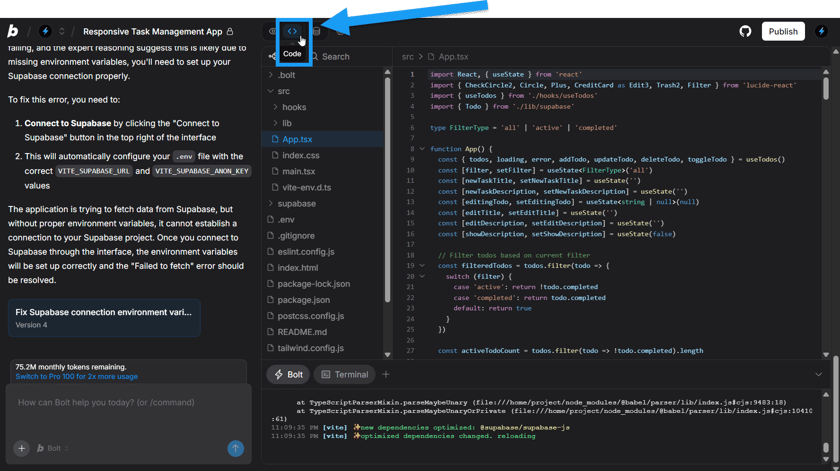
Code view exposes the project files for editing alongside the conversation and preview. Bolt Cloud supplies databases, authentication, storage and server functions, with built-in publishing to a bolt.host address. Paid plans add custom domains and larger resource allowances. GitHub integration supports existing repositories, automatic commits and branch creation. Merging branches still happens in GitHub, and collaborator changes sync when the project owner opens the project.
Bolt is most flexible in a desktop Chromium browser. Safari supports building, but its code view is read-only and previews are hosted. Mobile browsers can start projects, chat and publish; code editing, visual edits, database management and some project controls need desktop access. The supported backend languages are JavaScript-based, so Bolt is not a direct fit for an existing Python or PHP backend.
Best for
- Builders creating JavaScript web apps in the browser
- Developers combining prompts with direct code edits
- Teams prototyping websites or Expo mobile apps
Limitations
AI usage depends on the code and context Bolt processes, so token allowances do not represent a fixed number of prompts. Allocated rollover tokens expire and require an active paid plan. Hosting and database quotas remain separate. Safari and mobile have editing restrictions; mobile publishing makes the site public. Concurrent external and Bolt Git changes can conflict.
Bolt features
AI web and mobile app creation
Build websites and JavaScript apps through prompts, with Expo for supported mobile projects.
Direct code editing and preview
Inspect project files, change code and review the running app in the browser workspace. Safari code view is read-only.
Integrated backend services
Add databases, user authentication, storage and server functions through Bolt Cloud, or connect Supabase.
Built-in website hosting
Publish to a bolt.host address and use paid-plan custom domains, within the hosting allowance.
GitHub version control
Import repositories, create branches and sync code changes. GitHub handles branch merging.
Team collaboration
Share projects and work together; Teams adds central billing, access management and design-system support.
Bolt pricing
Free plan available. Plans priced per user. Visit Bolt for full plan details and current offers.
Example plans.
Pro — monthly
USD 25 / month
Bolt
Plan details
Starting allocation of 10 million tokens/month. No daily token cap. Hosting and database capacity still have limits.
Pro — annual commitment
USD 18 / month
Bolt
Plan details
Displayed monthly equivalent billed yearly, starting at 10 million tokens/month. Higher allocations have different prices.
Teams — monthly
USD 30 / user / month
Bolt
Plan details
Per member per month. Adds team billing, access management and shared design-system controls to Pro.
Technical specifications
App and website builders
| Feature | Bolt |
|---|---|
| Application outputs | Websites and JavaScript web apps; Expo integration supports mobile app projects. Node.js backends are supported, while PHP and Python backends are not.Supported project technologies |
| Code ownership and export | GitHub repository creation, import, automatic commits and incoming updates. Branches can be created in Bolt; merging is performed in GitHub.Owner-managed GitHub connection |
| Database and backend | Bolt Cloud provides databases, authentication, file storage and server functions. Supabase is an alternative database connection.Database and purchased resource capacity |
| Hosting and deployment | Built-in bolt.host publishing on Free and paid plans; custom domains on paid plans. Free lists up to 333,000 web requests, Pro up to 1 million.Current hosting allowances; not unlimited traffic |
| Generation and hosting limits | Token subscriptions: Free 1 million/month and 300,000/day; Pro begins at 10 million/month without a daily cap. Project context contributes to usage. Paid allocated tokens remain valid for two months from the original cycle start while a paid subscription is maintained.Tokens and hosting have separate limits |
Bolt alternatives
These app builders offer different development environments and deployment options.
Lovable
Prompt-based web app creation with a managed backend and shared workspace credits.
Compare with BoltReplit
A hosted development platform combining an editor, agents and application deployment.
Compare with BoltBolt FAQs
Can Bolt build mobile apps?
Yes. Bolt uses Expo for mobile app projects. This is distinct from opening the Bolt builder in a phone browser, where several editing controls are unavailable.
Does Bolt support Python or PHP backends?
No. Its supported backend technologies are JavaScript-based, including Node.js. JavaScript frontend frameworks are supported.
Can I edit Bolt’s generated code?
Yes, in Code view on a supported desktop Chromium browser. Safari provides read-only code view, and mobile browsers do not include it.
How does Bolt charge for AI generation?
Plans include tokens used to process prompts and project context and generate changes. Larger codebases can consume more per request; the same allowance does not guarantee the same number of messages.
Is this your product? Claim this page to update your listing.