

Descript
Descript: AI video editing, transcription and podcast production
Descript edits recorded video and audio through a linked transcript. Its editor brings together captions, voice cleanup, screen recording and AI-assisted production, with an API for automated projects.
Free plan availableAccount required
- Access
- Free and paid plans
- Example plan
- USD 24 / user / monthHobbyist
- Available on
- Web, Desktop, API
Edit recordings as easily as a document
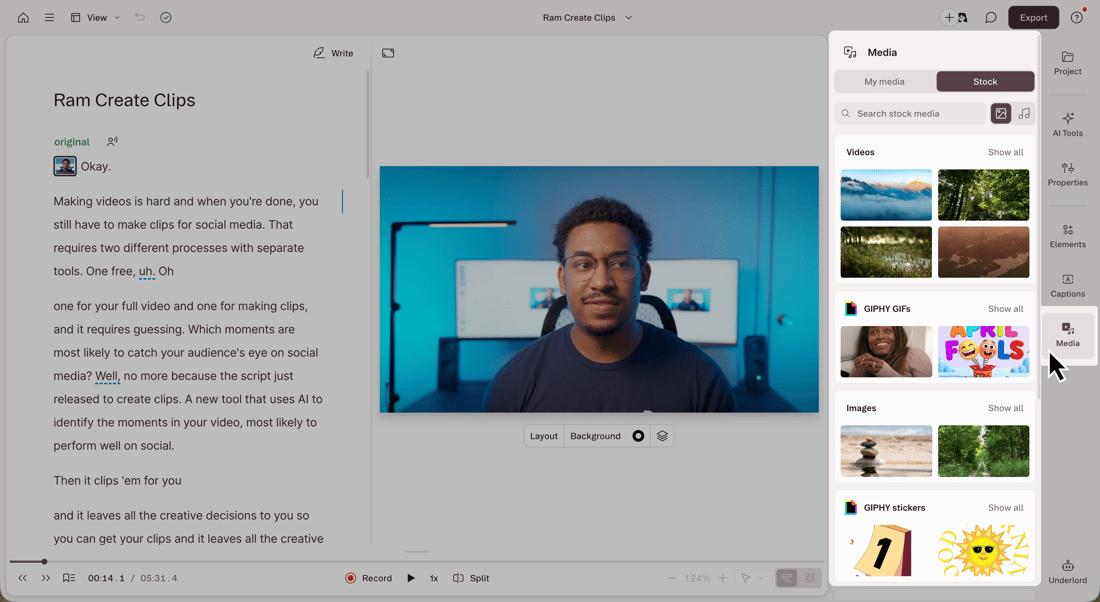
Descript connects a written transcript to the underlying recording. Removing a passage from the script cuts the corresponding audio or video; moving text rearranges the content. This makes interviews, podcast episodes and spoken explainers easier to structure without relying entirely on a traditional timeline. The visual editor remains available for scenes, layers, captions and supporting media. Transcript corrections and media cuts serve different purposes, so correcting a misspelled word does not have to change what the speaker said.
The production tools extend beyond transcription. Screen and webcam recording capture tutorials, while Rooms records conversations with up to ten participants in a browser. Studio Sound helps clean speech, and caption tools prepare social clips and accessible video. Underlord, currently labelled beta, works within a project to suggest or perform edits, add visuals and create shorter clips. Its actions can incur both reasoning and tool charges, including during conversation; the editor therefore uses a separate AI allowance alongside its processed-media balance.
Paid export quality rises from Hobbyist’s 1080p to Creator and Business 4K. Transcripts and SRT/VTT subtitles can also be exported separately, making the product useful when the final deliverable is text or captions rather than a video. Editor subscriptions contribute to a shared Drive allowance, while viewers do not add usage. The API can import media, create or edit projects and publish results using the same balances. Stock assets have their own licences: the integrated GIPHY GIFs and stickers are excluded from commercial use.
Best for
- Creators editing interviews, podcasts and recorded videos
- Teams making captioned clips and narrated explainers
- Editors who prefer transcript-based cuts with a visual timeline
Limitations
Media processing and AI actions have separate allowances, shared across the Drive. Monthly balances do not roll over; Free’s 100 AI credits are a one-time allocation. Creator/Business top-ups expire after 12 months. Transcription supports one language per file, Rooms does not work on mobile, and GIPHY GIFs/stickers are not licensed for commercial use. AI improvement settings affect use of uploaded and generated content.
Descript editing, recording and transcription features
Transcript-based cuts
Restructure spoken video or audio by editing the linked transcript, with scenes and a timeline for visual work.
Underlord co-editor
Ask the AI co-editor to revise a project, create clips and add captions or supporting assets. Conversation and actions can consume credits.
Speech cleanup
Studio Sound and filler-word tools support dialogue editing. Some language-specific tools are limited to English.
Recording and Rooms
Capture screen, webcam or audio, or record up to ten participants through browser-based Rooms.
Captions and text exports
Publish captioned video, export SRT/VTT subtitles, or save a transcript as DOCX, TXT, RTF, Markdown or HTML.
Production API
Automate media import, project editing and publishing. API work uses the same media-minute and AI-credit balances.
Descript pricing
Free plan available. Plans priced per user. Visit Descript for full plan details and current offers.
Example plans.
Hobbyist
USD 24 / user / month
Descript
Plan details
10 media hours/month and 400 AI credits per editor; Drive-shared balances; 1080p watermark-free export.
Creator
USD 35 / user / month
Descript
Plan details
30 media hours/month and 800 AI credits per editor; 4K watermark-free export.
Business
USD 65 / user / month
Descript
Plan details
40 media hours/month and 1,500 AI credits per editor; 4K export. Up to five separately billed editors.
Technical specifications
Video creation
| Feature | Descript |
|---|---|
| Generation or editing workflow | Transcript-linked editing for recorded video and audio, with a timeline, scenes, captions and an AI co-editor. This is an editing platform rather than only a text-to-video model.Current product |
| Inputs and references | Uploaded audio/video, microphone/webcam or screen recordings, and browser-based Rooms sessions with up to 10 participants. Rooms does not support mobile devices.Media processing consumes the shared monthly media allowance |
| Duration and resolution | Free exports watermarked 720p video. Hobbyist supports watermark-free 1080p; Creator and Business support 4K. Export audio, transcripts and separate subtitle files, or publish a web link.Resolution depends on plan |
| Editing and captions | Cut recordings by editing the transcript; combine scenes, layers and media in the timeline. Underlord can help produce clips and captions. AI actions and co-editor conversations consume credits.AI co-editor currently labelled beta |
| Watermarks and usage rights | User-content rights and third-party licences govern publishing. Stock includes GIPHY GIFs/stickers that are not licensed for commercial use. AI input/output may be used for product improvement unless opted out; provider contracts prohibit their training use.Asset-specific rights; AI terms section 8.4 |
| Export height (pixels) | 1080Maximum Hobbyist export height; Creator/Business offer 4K separately |
| API access | SupportedUses the same plan media/AI balances; file output requires publishing |
Transcription and meetings
| Feature | Descript |
|---|---|
| File and meeting capture | Upload or record audio/video and edit the resulting transcript with linked media. Rooms provides browser-based participant recording rather than a meeting bot.Up to 10 Rooms participants; mobile Rooms unsupported |
| Transcription languages | Transcribes English, French, German, Spanish, Portuguese and other supported languages. Only one language per file is supported; filler-word detection and some script tools are English-only.Language-specific feature support |
| Speaker-label workflow | Speaker labels and multitrack transcription support interviews and participant recordings. Names and transcript corrections can be edited.Speaker detection and labelling |
| Transcript exports | Transcript: DOCX, TXT, RTF, Markdown or HTML, with optional timestamps and speaker labels. Subtitles: SRT or VTT. Burned-in captions are a separate video treatment.Transcript and subtitle files |
| Recording and usage limits | Hobbyist includes 10 media hours/month per billed editor, shared across the Drive. Uploads and recordings also use this balance; it is not a separate transcription-only allowance. AI credits are metered independently.Media minutes pooled across audio/video and recording |
| API access | SupportedMedia import, transcript export and publishing; common plan allowances |
Descript alternatives
These tools cover different parts of video production and transcription.
CapCut
A visual video editor for social content, effects and template-based production.
Compare with DescriptTrint
A transcription platform for teams working with interviews and spoken source material.
Compare with DescriptHeyGen
Create avatar-led videos from scripts rather than editing a recorded presenter.
Compare with DescriptDescript FAQs
Is Descript free?
Free includes one media hour per month, 100 one-time AI credits and watermarked 720p video exports. Paid plans add larger allowances and watermark-free export.
How much does Descript cost?
Monthly subscriptions cost USD 24 per editor for Hobbyist, USD 35 for Creator and USD 65 for Business. Annual billing has monthly equivalents of USD 16, 24 and 50. Every editor seat is billed separately.
Do Descript media hours and AI credits roll over?
Monthly included balances do not roll over. Creator and Business can purchase top-ups, which expire after 12 months and are used after the monthly balance. Editor allowances are pooled across the Drive.
Can Descript export subtitles and transcripts?
Yes. Subtitle files can be exported as SRT or VTT. Transcript formats include DOCX, TXT, RTF, Markdown and HTML, with timestamp and speaker-label options.
Is this your product? Claim this page to update your listing.